
Home office video calls have become a ubiquitous aspect of modern professional life. Effective lighting is paramount for clear communication and a professional appearance during these virtual interactions. This article explores strategies for optimizing video call lighting through the strategic use of stylish lamps, moving beyond rudimentary solutions to embrace aesthetic and functional integration.
Adequate lighting transcends mere visibility; it is a foundational element of effective non-verbal communication in a digital environment. Just as a sculptor needs light Laniusdesign to reveal the nuances of their creation, good lighting enables viewers to perceive facial expressions and cues accurately. Poor lighting, conversely, can create a multitude of issues that detract from a professional image and impede communication.
Understanding the Pitfalls of Poor Illumination
Several common lighting deficiencies plague home office setups. These issues can range from subtle annoyances to significant detractors.
- Shadows: Harsh, overhead light sources often cast deep shadows under the eyes, nose, and chin, making the videographer appear tired or even intimidating. These shadows obscure facial features, making it difficult for others to gauge expressions. Imagine a stage actor performing in a single spotlight from above; details are lost, and the performance suffers.
- Backlighting: When the primary light source is behind the videographer, their face becomes a silhouette. This “witness protection” effect renders an individual largely indistinguishable, hindering connection and trust. It’s akin to trying to identify someone standing in front of a bright window at sunset – all you see is an outline.
- Color Temperature Inconsistencies: Different light sources emit light of varying color temperatures, measured in Kelvin (K). A mix of warm (yellowish) and cool (bluish-white) light can create an unnatural and unflattering cast on the skin. This effect is similar to viewing a painting under mismatched exhibition lights, where the artist’s original intent is distorted.
- Glare and Hotspots: Uncontrolled light can reflect off glasses, shiny surfaces, or even the skin, creating distracting hotspots or glare. These bright patches can be visually jarring and divert attention from the speaker. Think of a camera flash reflecting off a mirror, momentarily blinding the viewer.
- Insufficient Brightness: A dimly lit environment can make the videographer appear unprofessional and reduce overall video quality. The camera sensor struggles in low light, introducing noise and grain, detracting from clarity. This is comparable to trying to read a document in a poorly lit room; details become fuzzy and harder to discern.
Principles of Optimal Video Call Lighting
Achieving optimal lighting for video calls involves understanding fundamental photographic and videographic principles. The goal is to illuminate the face evenly, create depth, and avoid harsh contrasts.
The Three-Point Lighting System
The three-point lighting system, a standard in cinematography and photography, offers a robust framework for home office video lighting. While full implementation may be excessive for a typical home office, understanding its components helps in strategic lamp placement.
- Key Light: This is the primary and strongest light source, positioned slightly to one side of the videographer and angled towards them. It provides the main illumination, defining facial features and creating volume. For home office use, this is often the most critical lamp. Consider it the sun in a mini solar system, providing the primary illumination.
- Fill Light: Positioned on the opposite side of the key light, the fill light is softer and less intense. Its purpose is to soften shadows created by the key light, reducing contrast and providing a more balanced appearance. This light acts like a secondary, softer sun, diffusing the harshness of the primary light.
- Backlight (Hair Light): Placed behind and above the videographer, the backlight separates them from the background, adding depth and dimension. This light creates a subtle halo effect around the head and shoulders, preventing the videographer from blending into the background. Imagine a subtle glow outlining an object, making it stand out against its backdrop.
Softness and Diffusion
Hard light, directly from a bare bulb, creates harsh shadows and intense highlights. Soft light,Conversely, produces a more even illumination with gradual shadow transitions, resulting in a more flattering appearance.
- Diffusers: Materials that scatter light, such as frosted glass, fabric shades, or specialized diffusers, can transform hard light into soft light. This is akin to a cloudy day, where the clouds act as a natural diffuser, softening the sun’s rays.
- Reflectors: White or silver surfaces can bounce light back onto the subject, acting as a natural fill light. A simple white poster board positioned opposite the key light can effectively reduce shadows. This is similar to how a mirror can redirect light to illuminate a darker area.
Integrating Style with Functionality: The Lamp as a Solution
Beyond their utilitarian purpose, lamps can significantly contribute to the aesthetic of a home office. Choosing the right lamp involves balancing design preferences with lighting requirements for video calls.
Types of Lamps for Video Call Lighting
Various lamp types offer distinct advantages for video conferencing. The selection depends on available space, existing room lighting, and desired aesthetic.
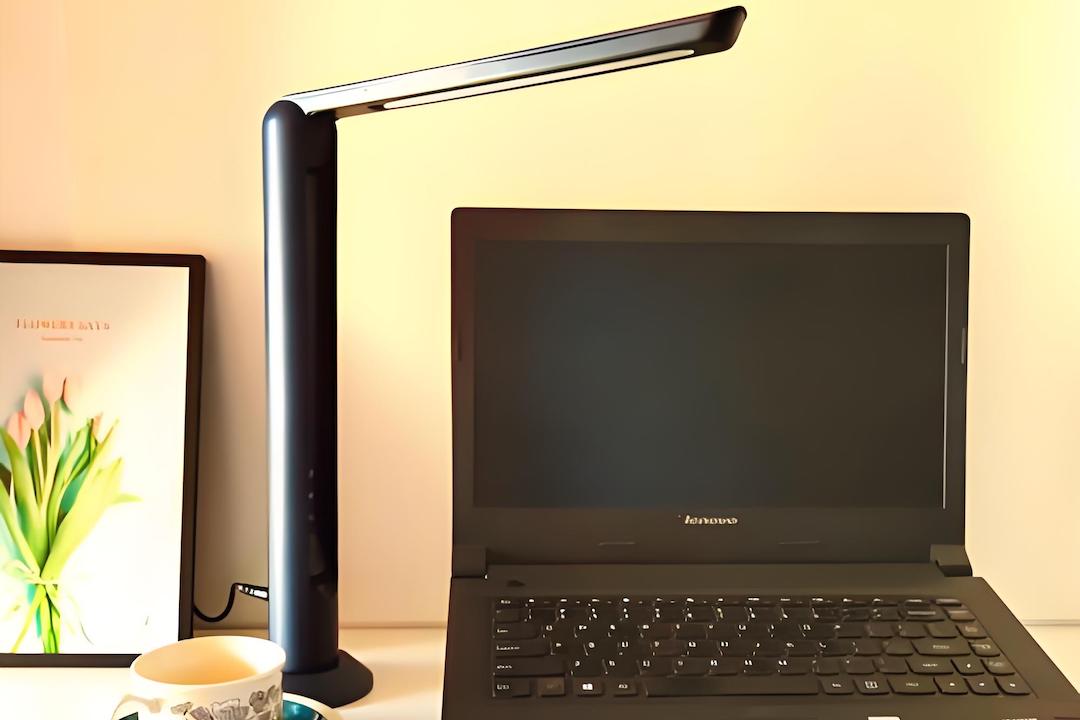
- Desk Lamps: A well-placed desk lamp can serve as an effective key light. Look for models with adjustable arms and heads, allowing for precise control over light direction. Dimmable options further enhance versatility. A gooseneck lamp, for instance, offers unparalleled flexibility in positioning.
- Floor Lamps: Tall floor lamps can provide a broader spread of light and are particularly useful if desk space is limited. Arc floor lamps, with their extending arms, can project light over a desk without occupying valuable surface area. These are like a taller, more expansive light source, capable of illuminating a larger area.
- Table Lamps: While primarily decorative, a table lamp with an appropriate shade can function as a soft fill light or a gentle key light if positioned strategically. Look for lamps with translucent shades that diffuse light evenly.
- Ring Lights: Specifically designed for video and photography, ring lights provide a soft, even illumination directly in front of the camera, minimizing shadows and creating a flattering catchlight in the eyes. While sometimes less “stylish” in a traditional sense, compact versions can be unobtrusive and highly effective. They are a dedicated tool for the specific task of illuminating a face.
Aesthetic Considerations and Integration
The chosen lamp should complement the existing décor of the home office. A lamp is not merely a light source; it is a piece of furniture that contributes to the overall ambiance.
- Material and Finish: Lamps are available in various materials such as metal, wood, ceramic, and glass, with finishes ranging from polished chrome to matte black. Select a material and finish that harmonize with other elements in the room. For example, a minimalist office might benefit from a sleek metal lamp, while a more traditional space could accommodate a lamp with a classic wooden base.
- Shade Design: The lamp shade plays a crucial role in both aesthetics and light diffusion. Fabric shades offer a softer, warmer light, while metal or opaque shades direct light more intensely. Consider the opulence of parchment or linen shades for a diffused glow.
- Size and Scale: The lamp’s size should be proportionate to the desk and room dimensions. An oversized lamp in a small space can feel overwhelming, while a diminutive lamp in a large room may appear insignificant. It must be in balance, like the proportions of a classical building.
- Style Cohesion: Ensure the lamp’s style aligns with the overall design language of the home office. A modern industrial lamp might clash with a bohemian aesthetic, for instance. The lamp should be a seamless addition, not a discordant note.
Practical Implementation and Setup
Once suitable lamps are selected, effective placement and configuration are crucial. Experimentation is often necessary to achieve optimal results.
Positioning Your Key Light
The key light is your primary weapon against shadows. Its placement is critical.
- Angle: Position the key light slightly to one side of your face (approximately 30-45 degrees off-center) and slightly above eye level. This angle sculpts the face, creating natural shadows and highlights that add depth. Imagine the angle a portrait artist uses to illuminate their subject.
- Distance: The distance from the lamp to your face affects the spread and intensity of the light. Closer light sources appear softer (especially with diffusers) but can be overly bright. Further light sources are harder but cover a wider area. Adjust until the illumination is even and comfortable. Think of a spotlight – too close and it’s blinding, too far and it loses impact.
- Diffusion: Always consider using a diffuser if your key light is a bare bulb. This softens the light and reduces harsh shadows. A simple white cloth over a desk lamp can make a significant difference.
Introducing Fill Light
The fill light mitigates the shadows cast by the key light.
- Opposite Side: Place the fill light on the opposite side of your face from the key light.
- Softer Intensity: The fill light should be less intense than the key light. This can be achieved by using a lower wattage bulb, dimming the light, or increasing its distance. Alternatively, a white reflector can serve as a highly effective, passive fill light. Imagine the fill light as a gentle hand, softening the edges created by the more assertive key light.
Managing Background Illumination
While the focus is on your face, the background should not be neglected.
- Avoid Backlighting: Ensure no strong light sources are directly behind you, such as windows or bright overhead fixtures. If unavoidable, use blinds or curtains to reduce their intensity.
- Subtle Illumination: Gentle ambient light in the background can add depth and prevent a “floating head” effect. A bedside lamp or a small accent light can achieve this without competing with your main illumination. This background light serves to separate you from the setting, adding visual interest.
Color Temperature Matching
Consistency in color temperature is vital for a natural look.
- Identical Bulbs: Ideally, all light sources used for your video call setup should have the same color temperature (e.g., all 4000K “cool white” or all 2700K “warm white”).
- LED Versatility: Many modern LED lamps offer adjustable color temperature, allowing you to fine-tune the light to match ambient room lighting or your preference. This is like a chameleon, adapting its color to blend seamlessly with its surroundings.
Advanced Considerations and Refinements
Moving beyond the basics, several techniques can further enhance your video call lighting.
Utilizing Natural Light
Natural daylight is often the most flattering light source.
- Strategic Window Placement: Position your desk facing a window, allowing natural light to illuminate your face evenly. This serves as an excellent key light.
- Diffusion for Harsh Sunlight: Direct sunlight can be too harsh, creating overexposure and strong shadows. Use sheer curtains, blinds, or even a translucent diffuser to soften the light. Think of a sun shower, where the rain diffuses the sun’s rays.
- North-Facing Windows: If possible, a north-facing window (in the Northern Hemisphere) provides consistent, soft light throughout the day, as it receives indirect sunlight.
Smart Lighting Systems
For ultimate control and convenience, consider integrating smart lighting.
- App Control: Smart lamps can often be controlled via smartphone apps, allowing for precise adjustments to brightness, color temperature, and even color.
- Scheduled Scenes: Create predefined lighting scenes for different video call scenarios (e.g., a “professional” scene with balanced white light, a “casual” scene with warmer tones). This is like a theatrical director setting different lighting cues for various scenes in a play.
- Voice Control: Integration with smart home assistants (e.g., Alexa, Google Assistant) enables hands-free control of your lighting setup.
Camera White Balance
Even with perfect lighting, your camera’s white balance setting can affect how colors appear.
- Automatic White Balance (AWB): Most cameras have an automatic white balance setting that attempts to adjust for the prevailing light.
- Manual White Balance: For optimal color accuracy, manually set your camera’s white balance to match the color temperature of your light sources. This ensures that whites appear white and skin tones are accurate. This is akin to calibrating a musical instrument to ensure it plays in tune.
Maintenance and Longevity
Proper care for your lighting equipment ensures consistent performance and extends its lifespan.
Bulb Selection and Replacement
- Energy Efficiency: Opt for LED bulbs, which are energy-efficient and generate less heat than incandescent or fluorescent bulbs.
- Lumen Output: Pay attention to lumen output rather than wattage for brightness. Lumens directly measure light intensity.
- Color Rendering Index (CRI): Choose bulbs with a high CRI (90+) for accurate color reproduction, which is especially important for skin tones.
- Regular Cleaning: Dust can accumulate on bulbs and shades, reducing light output and potentially altering color. Regularly clean your lamps to ensure maximum efficiency.
Cable Management
- Safety: Tidy cable management prevents tripping hazards and creates a cleaner, more professional workspace.
- Aesthetics: Loose cables detract from the overall aesthetic of your home office. Use cable ties, sleeves, or cable management boxes to keep wires organized. This meticulousness contributes to a polished presentation.
In conclusion, optimizing your home office video call lighting with a stylish lamp is a confluence of functional necessity and aesthetic choice. By understanding the principles of good illumination, strategically integrating lamps that complement your workspace, and meticulously refining your setup, you can transform your virtual presence. This investment in considered lighting is not merely about visibility; it is about projecting professionalism, fostering clearer communication, and ultimately, enhancing your effectiveness in the digital sphere. The lamp is no longer just an object that provides light; it is a silent collaborator in your professional endeavors, shaping perception and facilitating connection.
About the Author